
c++ std::print
概述
C++23 引入了 std::print 和 std::println,这是现代 C++ 对格式化输出的重大改进。相比传统的 printf,这些新函数提供了类型安全、性能优异且易于使用的格式化输出方案。
基本用法
简单输出
#include <print>

int main() {
    // 基本输出
    std::print("Hello, World!\n");

    // 带换行的输出
    std::println("Hello, World!");

    return 0;
}
格式化输出
#include <print>
#include <string>

int main() {
    int age = 25;
    std::string name = "Alice";

    // 格式化输出
    std::print("Name: {}, Age: {}\n", name, age);

    // 带换行的格式化输出
    std::println("Name: {}, Age: {}", name, age);

    return 0;
}
格式化说明符
位置参数
std::print("{0} {1} {0}\n", "hello", "world");  // 输出: hello world hello
std::print("{1} {0}\n", "world", "hello");      // 输出: hello world
对齐和填充
// 右对齐(默认)
std::print("{:>10}\n", "test");        // 输出:[      test]

// 左对齐
std::print("{:<10}\n", "test");        // 输出:[test      ]

// 居中对齐
std::print("{:^10}\n", "test");        // 输出:[   test   ]

// 使用指定字符填充
std::print("{:0>10}\n", 42);           // 输出: [0000000042]
std::print("{:*^10}\n", "test");       // 输出: [***test***]
数值格式化
进制表示
int num = 255;

// 十进制(默认)
std::print("{}\n", num);               // 输出: 255

// 十六进制
std::print("{x}\n", num);              // 输出: ff
std::print("{X}\n", num);              // 输出: FF

// 八进制
std::print("{o}\n", num);              // 输出: 377

// 二进制
std::print("{b}\n", num);              // 输出: 11111111

// 带前缀的进制表示
std::print("{:#x}\n", num);            // 输出: 0xff
std::print("{:#o}\n", num);            // 输出: 0377
std::print("{:#b}\n", num);            // 输出: 0b11111111
浮点数精度
double pi = 3.14159265359;

// 默认精度
std::print("{}\n", pi);                // 输出: 3.14159

// 指定精度
std::print("{:.2}\n", pi);             // 输出: 3.1
std::print("{:.4}\n", pi);             // 输出: 3.142

// 固定小数位数
std::print("{:.2f}\n", pi);            // 输出: 3.14

// 科学技术法
std::print("{:.2e}\n", pi);            // 输出: 3.14e+00
符号和空格
int pos = 42;
int neg = -42;
int zero = 0;

// 始终显示符号
std::print("{:+} {:+} {:+}\n", pos, neg, zero);  // 输出: +42 -42 +0

// 空格表示正数
std::print("{: } {: } {: }\n", pos, neg, zero);  // 输出:  42 -42  0

// 负数显示负号(默认)
std::print("{} {} {}\n", pos, neg, zero);        // 输出: 42 -42 0
字符串格式化
字符串截断和填充
std::string long_text = "This is a very long text";

// 截断
std::print("{:.10}\n", long_text);       // 输出: This is a v

// 指定宽度截断
std::print("{:.10}\n", long_text);       // 输出: This is a v

// 填充和对齐
std::print("{:>20}\n", long_text);       // 输出: This is a very lon
高级格式化
百分号和特殊字符
// 转义大括号
std::print("{{}}", "hello");             // 输出: {hello}

// 百分号
std::print("{:.1%}\n", 0.75);            // 输出: 75.0%
分组和千位分隔符
#include <locale>

// 千位分隔符(需要locale)
auto locale = std::locale("");
std::print(std::format(locale, "{:L}\n", 1000000));  // 输出: 1,000,000
日期和时间
#include <chrono>
#include <ctime>

auto now = std::chrono::system_clock::now();
std::time_t time = std::chrono::system_clock::to_time_t(now);

// 格式化时间(注意:这是概念性示例,实际可能需要额外处理)
std::print("Current time: {}\n", std::ctime(&time));
类型安全特性
自动类型推导
#include <print>

int main() {
    // C++23 自动推导类型,无需手动指定格式说明符
    int i = 42;
    double d = 3.14;
    std::string s = "hello";

    std::print("{} {} {}\n", i, d, s);  // 类型安全!

    // 传统 printf 需要这样写:
    // printf("%d %f %s\n", i, d, s.c_str());

    return 0;
}
自定义类型支持
#include <print>
#include <vector>

// 为自定义类型提供格式化支持
struct Point {
    int x, y;
};

template<>
struct std::formatter<Point> : std::formatter<std::string> {
    auto format(const Point& p, std::format_context& ctx) const {
        return std::formatter<std::string>::format(
            std::format("({}, {})", p.x, p.y), ctx);
    }
};

int main() {
    Point p{10, 20};
    std::print("Point: {}\n", p);  // 输出: Point: (10, 20)
    return 0;
}
与 printf 的性能对比
| 特性 | std::print (C++23) | printf © |
|---|---|---|
| 格式化方式 | 基于 std::format,编译期类型检查 | 运行时解析格式字符串 |
| 中间缓冲 | 可直接写入 C 流 buffer,避免额外拷贝 | 通常涉及内部缓冲和解析 |
| 并发输出 | 保证线程安全且输出不交错 | 输出可能交错,需手动加锁 |
| 性能优化 | 提案 P3107 实现中,比 printf 快约 20% | 性能较差,尤其在复杂格式时 |
性能优势来源(std::print):
- 直接格式化到 C 流缓冲区,避免中间 std::string 构造和拷贝;
- 避免重复解析格式字符串,利用 std::format 的编译期优化;
- 线程安全输出,无需额外同步开销即可避免交错输出 。
实际应用示例
调试输出
#include <print>

class Logger {
public:
    enum Level { DEBUG, INFO, WARNING, ERROR };

    static void log(Level level, const std::string& message) {
        std::print("[{}] {}\n", level_to_string(level), message);
    }

private:
    static std::string level_to_string(Level level) {
        switch (level) {
            case DEBUG: return "DEBUG";
            case INFO: return "INFO";
            case WARNING: return "WARNING";
            case ERROR: return "ERROR";
            default: return "UNKNOWN";
        }
    }
};

// 使用示例
Logger::log(Logger::INFO, "Application started");
Logger::log(Logger::ERROR, "Failed to connect to database");
数据报告生成
#include <print>
#include <vector>
#include <algorithm>
#include <numeric>

void generate_report(const std::vector<double>& data) {
    if (data.empty()) {
        std::print("No data available\n");
        return;
    }

    auto min_val = *std::min_element(data.begin(), data.end());
    auto max_val = *std::max_element(data.begin(), data.end());
    auto avg = std::accumulate(data.begin(), data.end(), 0.0) / data.size();

    std::print("Data Report:\n");
    std::print("  Count: {}\n", data.size());
    std::print("  Min:   {:.2f}\n", min_val);
    std::print("  Max:   {:.2f}\n", max_val);
    std::print("  Avg:   {:.2f}\n", avg);
}
JSON 样式输出
#include <print>
#include <map>
#include <string>

void print_json_style(const std::map<std::string, int>& data) {
    std::print("{{\n");
    bool first = true;
    for (const auto& [key, value] : data) {
        if (!first) std::print(",\n");
        std::print("  \"{}\": {}", key, value);
        first = false;
    }
    std::print("\n}}\n");
}
最佳实践
1. 优先使用 std::println 而不是 std::print
// 推荐
std::println("Processing item {}: {}", id, name);

// 不推荐(除非需要特定换行控制)
std::print("Processing item {}: {}\n", id, name);
2. 利用类型安全,避免手动格式说明符
// 推荐:类型安全
std::print("Value: {}\n", my_value);

// 避免:容易出错
std::print("Value: %d\n", my_value);  // 如果 my_value 不是 int 会出错
3. 使用命名参数提高可读性
struct Config {
    int port;
    std::string host;
    bool ssl;
};

void print_config(const Config& cfg) {
    std::print("Config {{\n");
    std::print("  host: {}\n", cfg.host);
    std::print("  port: {}\n", cfg.port);
    std::print("  ssl:  {}\n", cfg.ssl ? "true" : "false");
    std::print("}}\n");
}
4. 自定义格式化器提升调试效率
#include <print>

// 为常用调试类型提供格式化器
template<typename T>
struct std::formatter<std::vector<T>> : std::formatter<std::string> {
    auto format(const std::vector<T>& vec, std::format_context& ctx) const {
        std::string result = "[";
        for (string delim = ""; auto one : vec) {
            result += delim;
            result += std::format("{}", vec[i]);
            delim = ", ";
        }
        result += "]";
        return std::formatter<std::string>::format(result, ctx);
    }
};

// 使用示例
std::vector<int> numbers = {1, 2, 3, 4, 5};
std::print("Numbers: {}\n", numbers);  // 输出: Numbers: [1, 2, 3, 4, 5]
与旧代码的集成
逐步迁移策略
#include <print>
#include <cstdio>

void legacy_function() {
    // 旧代码仍然可以使用
    printf("Old style: %d\n", 42);
}

void modern_function() {
    // 新代码使用现代风格
    std::print("Modern style: {}\n", 42);
}

void mixed_usage() {
    // 可以在同一个文件中混合使用
    printf("Legacy: %s\n", "hello");
    std::print("Modern: {}\n", "world");
}
总结
C++23 的 std::print 代表了 C++ 标准库在用户体验方面的重大进步:
- 类型安全: 编译时检查,避免运行时错误
- 性能优异: 接近
printf的性能,同时提供更好的类型安全 - 易于使用: 现代格式化语法,无需记忆复杂的格式说明符
- 可扩展性: 支持自定义类型的格式化
- 向后兼容: 可以与现有代码无缝集成
这些特性使得 std::print 成为现代 C++ 开发中格式化输出的首选方案。建议在新项目中优先使用 std::print 和 std::println,并在适当时候将现有代码迁移到新的格式化方案。
记住 Linus 的教诲:“好品味意味着消除特殊情况”,std::print 正是这一理念的完美体现 - 它将原本复杂的格式化输出变成了简单、直观且类型安全的操作。
Related Articles

2025-08-17
C++ xxx_cast
在 C++ 中,提供了四种主要的类型转换操作符(cast),它们统称为 _cast 函数,用于在不同类型之间进行显式类型转换。这些操作符分别是 static_cast、dynamic_cast、const_cast 和 reinterpret_cast。它们取代了 C 风格的强制类型转换(如 (type)expression),提供了更安全、更清晰的类型转换方式。以下是对这四个 _cast 函数的详细讲解,包括它们的用途、语法、特点以及使用场景。 1. static_cast 定义 static_cast 是一种在编译时进行类型转换的操作符,用于执行相对安全的类型转换。它不会进行运行时类型检查,因此效率较高,但需要程序员确保转换的正确性。 语法 static_cast<目标类型>(表达式) 用途 基本数据类型转换:在内置类型之间进行转换,例如 int 到 float、指针类型之间的转换(在安全的情况下)。 类层次结构中的向上转换:将派生类指针或引用转换为基类指针或引用(这是安全的,因为派生类对象总是包含基类部分)。 调用显式构造函数或转换函数:用于调用用户定义的类型转换(...

2023-06-21
Cpp lambda and bind
1. 基本表达式 [capture](parameters) -> return-type {body} 当没有返回类型时, 可以省略 -> return-type 2. 变量捕获与lambda闭包实现 [] 不截取任何变量 [&] 截取外部作用域中所有变量,并作为引用在函数体中使用 [=] 截取外部作用域中所有变量,并拷贝一份在函数体中使用 [=, &foo] 截取外部作用域中所有变量,并拷贝一份在函数体中使用,但是对foo变量使用引用 [bar] 截取bar变量并且拷贝一份在函数体中使用,同时不截取其他变量 [x, &y] x按值传递,y按引用传递 [this] 截取当前类中的this指针。如果已经使用了&或者=就默认添加此选项。 3. lambda 的底层实现 lambda 其实是c++的语法糖,是通过c++编译器生成class来实现的,看一个简单的例子。 #include <functional> using namespace std; int main(int argc, char* argv[])...

2022-12-03
C++ namespace
C++命名空间是语言的核心特性之一,用于解决名字冲突问题,尤其在大项目或使用多个库时。基于最新C++23标准,命名空间用法稳定,但结合模块(modules)使用更高效。下面直击要害,逐一拆解,包括[inline namespace]、匿名命名空间和命名空间别名。 参考:[cppreference.com] 1. 基本用法:声明与定义 命名空间通过namespace关键字声明,内容可以分散在多个文件中定义(如同函数定义)。 namespace MyLib { int add(int a, int b) { return a + b; } class Widget { public: void use(); }; } 使用方式: 限定名:MyLib::add(1, 2); 最安全,避免污染全局。 using声明:using MyLib::add; 只引入add,作用域内可用add(1,2)。 using指令:using namespace MyLib; 引入整个空...
2026-01-18
Cpp Timeline
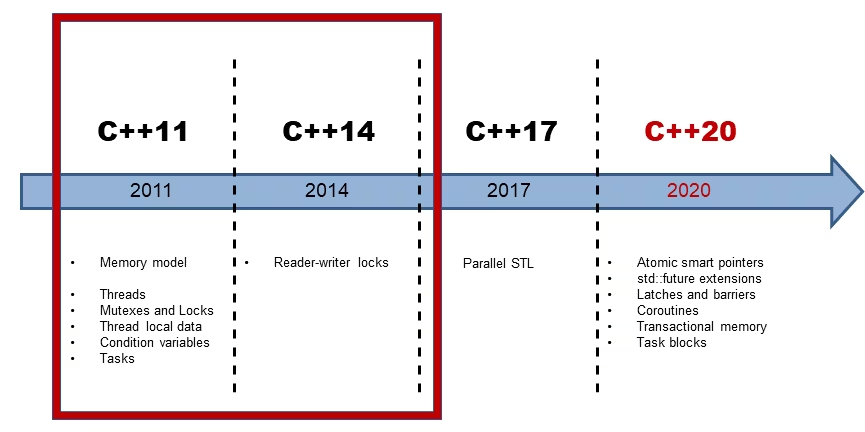
C++: 从 C++11 到 C++23 的演进之路 C++ 从 2011 年开始进入了快速发展的时代,每三年一个新标准,带来了大量现代特性。本文将梳理 C++11 到 C++23 的主要特性和常用特性。 C++11 Core Feature Library Concurrency Move semanticsLambda expressionsauto and decltypenullptrHash Tableconstexproverride/finalUniform initializationrange-based forenum classstatic_assertVariadic templatesAlias templatesDelegating constructorsInheriting constructorsRvalue references Smart pointersstd::functionstd::bindstd::unordered_map/setstd::arraystd::tuplestd::forward_liststd::ch...
2025-09-23
Cpp Asio
Asio 是一个跨平台的 C++ 库,用于网络和低级 I/O 编程,提供了一套异步操作的框架。Boost.Asio 是其最知名的版本,但独立(standalone)版本的 Asio 允许在不依赖 Boost 的情况下使用。 1. Asio 库概述 Standalone Asio 是一个轻量级的网络编程库,设计目标是提供高效、异步的 I/O 操作。它支持以下功能: 网络编程:TCP、UDP、ICMP 等协议的客户端和服务器开发。 异步 I/O:通过回调、协程(C++20 起支持)或 Future/Promise 模型处理异步操作。 跨平台:支持 Windows、Linux、macOS 等操作系统。 低级 I/O:文件操作、串口通信、定时器等。 与 Boost.Asio 相比,standalone Asio 不依赖 Boost 的其他组件(如 Boost.System),因此更轻量,适合需要减少依赖的场景。 2. 安装与配置 下载 Standalone Asio 可从 GitHub 或其官方网站(think-async.com)获取最新版本。下载后,解压到项目目录。 配置 头文...
2023-06-26
cpp中的rvo
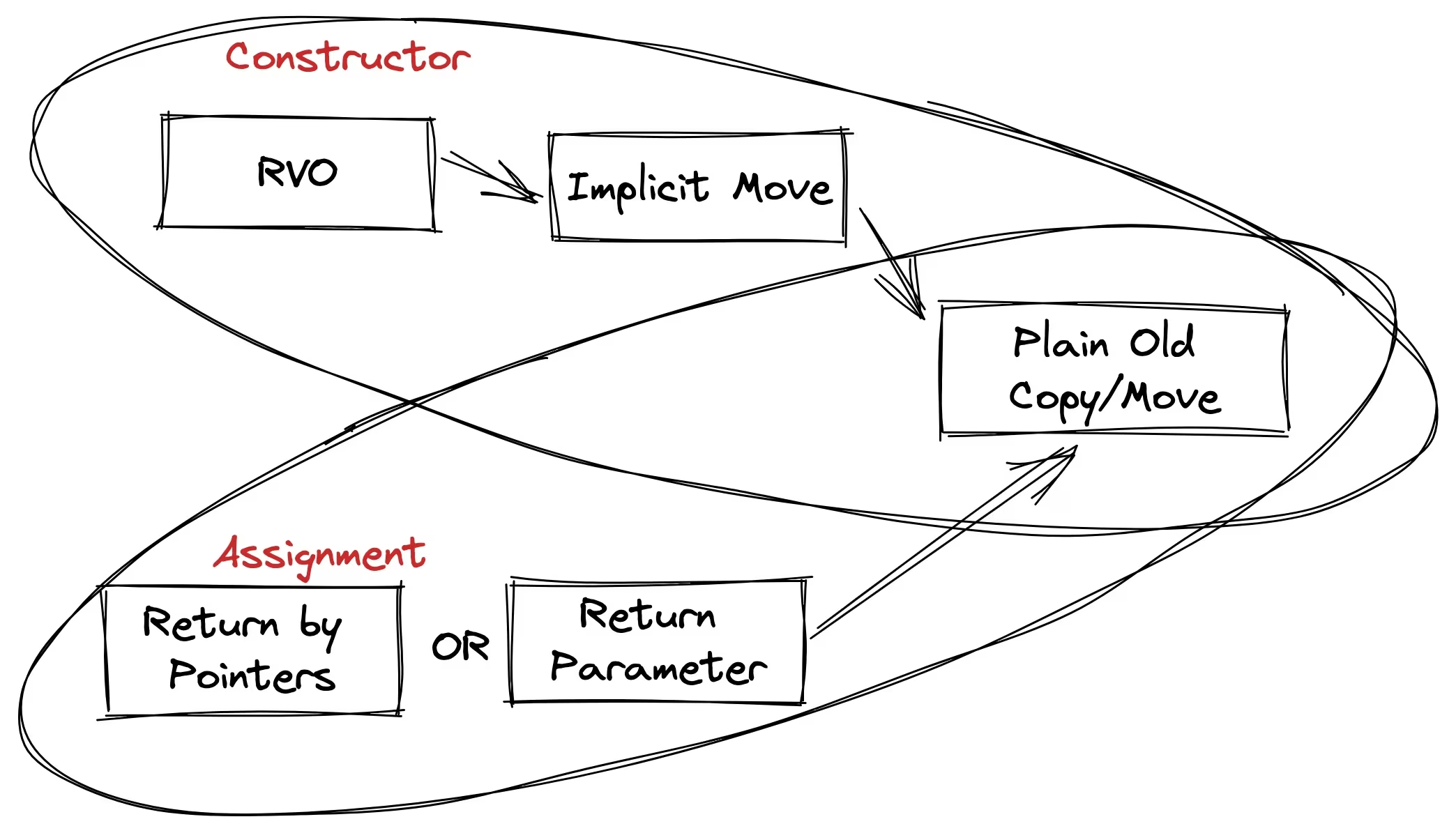
c++11 以后支持了nrvo(命名的rvo),先来一张图 直接贴代码 #include <iostream> #include <string> #include <vector> using namespace std; class BigObject { public: BigObject() { cout << "Constructor\n"; } ~BigObject() { cout << "Destructor\n"; } BigObject(BigObject const&) { cout << "Copy Constructor\n"; } BigObject& operator=(BigObject const&) { cout << "Assignment Operator\n"; return *this; ...